
August 3, 2026
[AU] July Product Release

New Features
Smarter Balance Extraction from Attached Documents
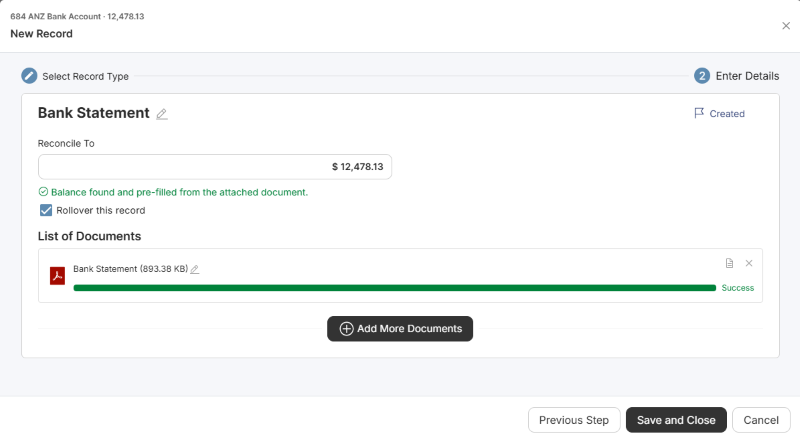
When you attach a PDF document to an account as a record, Active now scans it for the account balance in real time instead of waiting until you save.
What's included:
- Live balance scanning as a PDF uploads, with the reconciliation amount pre-filled when a match is found (still fully editable)
- Bulk-attach support from the Documents tab — every attached PDF is scanned in one pass, matching documents are highlighted, and reconciliation amounts are set in a single update
- The account balance now displays in the create-record modal header
- A safeguard for documents where the balance value appears more than four times — rather than guessing, Active flags it for you to confirm and reconcile manually.
What this means for you:
- Less manual keying — balances pre-fill themselves from your evidence
- Faster reconciliation when attaching several supporting documents at once
- No incorrect pre-fills on ambiguous documents
Improvements
Binder Email Notifications
Notifications now show the recipient's full name (helpful when multiple users have the same first name), use a more readable font size, and the "Send Notification" popup now shows the destination email address for easier auditing.
Clearer Errors on Binder Export Failures
In the rare case a binder export fails with a "web connectivity/timeout error", Active now aims to pinpoint which sheet or document is causing it — rather than showing a generic error.
Faster Workbook Initialisation
Workbooks now initialise significantly faster, especially for larger binders.
GST Transactions Review
- GST Transactions Review now offers a simplified "No Action Required"/"Resolved" option set to reduce clicks.
- GST Transactions Review now displays all transactions correctly at narrow browser widths.
- Added a "Save without comment" option to the GST Transactions Review comment popover.
Workpapers Content
New Features
B01 Summary
Following frequent requests from firms, the 2025 and 2026 versions of B01 Summary now include a tax estimate calculation. Previously, the worksheet summarised all individual tax return labels up to taxable income and primary tax only. It now calculates the estimated tax liability, giving preparers a complete picture of the client's tax position.
C05 Dividends Paid & Franking Account
A new ‘Tax Return Schedule’ section has been added to display franking account transactions in chronological order. The franking account now align with the ATO tax return franking account format.
A dedicated section for post year-end transactions has also been included.
Fixed the issue where franked dividends flowing from K04 Dividends were displaying in C05 Franking Account as unfranked, and vice versa. Franking status now displays correctly.
N75 Superannuation
Re-designed for Payday Super requirements. For Xero-connected clients, copy the Super Payments report from Xero and paste it directly into N75. The worksheet parses the pasted data to identify late or accrued super payments automatically.
TR_1 Tax Rates / TR_2 FBT Rates
The 2025 and 2026 tax rates have been updated to include Medicare Levy – Single, Medicare Levy – Family, Medicare Levy Surcharge thresholds and Study and Training Loan Repayment thresholds and rates to support tax estimate calculations in the B01 Summary for Individual taxpayers.
The 2027 tax rates and FBT rates have been released.

Improvements
- The Report Template Editor now warns you before you navigate away with unsaved changes, matching the protection already in place on the Journal editor.
- You can now set an individual total to display at a different decimal precision than the rest of the report.
- Spacer rows in the Report Table Row Editor can now be assigned to a Section, so section-scoped layout stays correct around spacers
get activated

Active is a cloud platform delivering accounting automation by reducing friction through workpaper and financial reporting processes.