Use the AI assistant your firm already has, on your client files
Active's MCP server connects Claude and Microsoft 365 Copilot to Active, so your team can ask in plain English and get answers from the job, with access limited to what each person can already see.
Your assistant is good. It just can't see the client file.
Somebody in your firm already uses an AI assistant every day for emails, phrasing and first drafts. They have never been able to ask it anything about a client, because everything that matters at year end sits inside the accounts system and the assistant sits outside it. Closing that gap by copying and pasting is slower than doing the job by hand.
Active's MCP server closes it from the inside. Nothing new to learn: the interface is the assistant you already have open.
What is an MCP server?
An MCP server is a connector that lets an AI assistant safely work with another system. It is built to the Model Context Protocol, an open standard for this kind of integration. The assistant asks the system for something, the system checks whether that is allowed, and the answer comes back in a form the assistant can use.
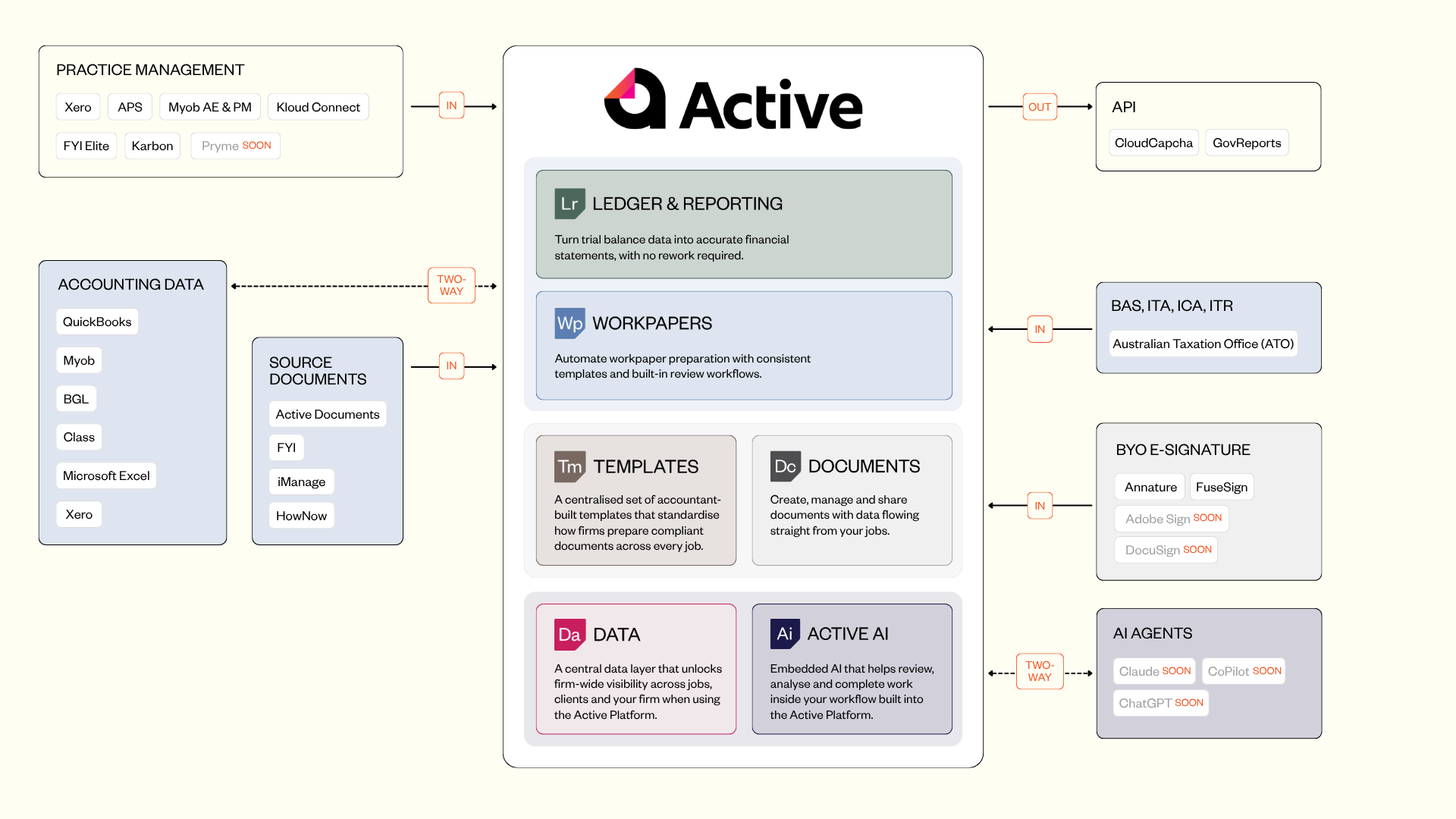
It sits alongside the integrations Active already maintains with Xero, QuickBooks and the rest, and works on the same principle: a connection Active keeps up so your firm does not have to.
Five jobs your assistant can do in Active
Brief me on the year end before the call
Built from the binder, its workpaper records and the query history. What is done, what is outstanding, what the firm is waiting on the client for.
Round up the client queries
Outstanding client queries on a client are compiled into one letter, each checked against its evidence first. Marked as sent only when you confirm.
Find and file
Documents the firm already holds go to the right job. Runs only where write access is switched on.
Find things without clicking
Who is in a client group, which entity has a job open this year, where the signed engagement letter is.
Raise a query or internal note
Ask your assistant to raise it against the client and assign it, with the evidence attached.
Open by design, so you are not locked to one AI
MCP is an open specification that belongs to neither Active nor any one AI company. Today it works with:
Claude
The Active plugin for Claude is deployed and working, including the pre-built guided skills.
Microsoft 365 Copilot
Connects through Copilot Studio or the Admin Centre. Copilot gets the same tools, without the guided skills that ship in the Claude plugin.
A firm that moves to a different assistant in eighteen months keeps the connection and changes the assistant. Active has not built a chatbot of its own, because an assistant is a place you have to go and your team already has one.
What the AI can and cannot see
Connecting AI to client data is safe when the connection cannot do anything the person using it could not already do. Access to Active authenticates as the individual user and is checked on every call.
You set the access level
Read-only or read and write. Read-only is where most firms start.
You choose who has it
Only people you tick have access. Turning someone off takes effect straight away.
Nothing is copied
Nothing is copied or synced in the background. The assistant only receives what that person asks for, when they ask.
Sign-off stays human
Approving and completing a workpaper is refused to the assistant outright, whatever rights the person signed in holds.
Pre-built skills, and your own
The guided jobs above are pre-built skills: you ask in an ordinary sentence and the work behind it is already defined. The skills Active publishes are free, in a public repository. Anyone can read them, fork them or write their own.
What a firm builds from there is specific to how it works: its review conventions, the way it grades a job, the questions its partners always ask and nobody has written down. Built as a skill, a firm's way of working stops being something it explains and becomes something the system does. Enforceable standards without removing professional judgement
Getting set up
Setup is done by an administrator, then switched on person by person. A step-by-step article, MCP Server Setup, is in Active Help. Not ready for any of this? Active works exactly as it does today.
How it is licensed
The MCP server is part of Active AI, one module licensed per user, with no tiers. When you use Active through the MCP server, the AI work happens on your own Claude or Copilot subscription, so Active does not meter your assistant's usage.
Active AI is free to preview until 31 December 2026. Firms come on by invitation, so book a demo and we will get you switched on.
Ready to take accounting to the cloud?
Get Active.
A cloud-based, automated, collaborative workspace for faster workpapers, accounts, and tax.
Questions? We have answers…
We’d love to help answer any questions you have about Active. If you can’t find what you’re looking for below, email us at activeuk@businessfitness.com or book a demo here.
Active is a cloud-based platform that streamlines workpapers, accounts, and tax with seamless integrations, automation, and standardised workflows.